The Kaaba and the Mataf at sunset as drawn in the 3D walk, with pilgrims in ihram making tawaf

darbiya · Umrah guide

Walk through Umrah before you go

An interactive guide to Masjid al-Haram. Walk from the gate to the Kaaba, count your seven circuits of tawaf, go between as-Safa and al-Marwah, and read the du'a for each place, with its source.

  • Free, no sign-up
  • English and বাংলা
  • 3D walk or 2D map
  • Spoken guide, a man's or a woman's voice
  • Works offline after the first visit

Free. Works on ordinary phones and offline after the first visit. An illustration for learning, not live positioning.

Two ways to follow: 3D or 2D

Both follow the same ten stages, the same steps and the same du'as. You can switch between them at any time from the menu, and your place is kept.

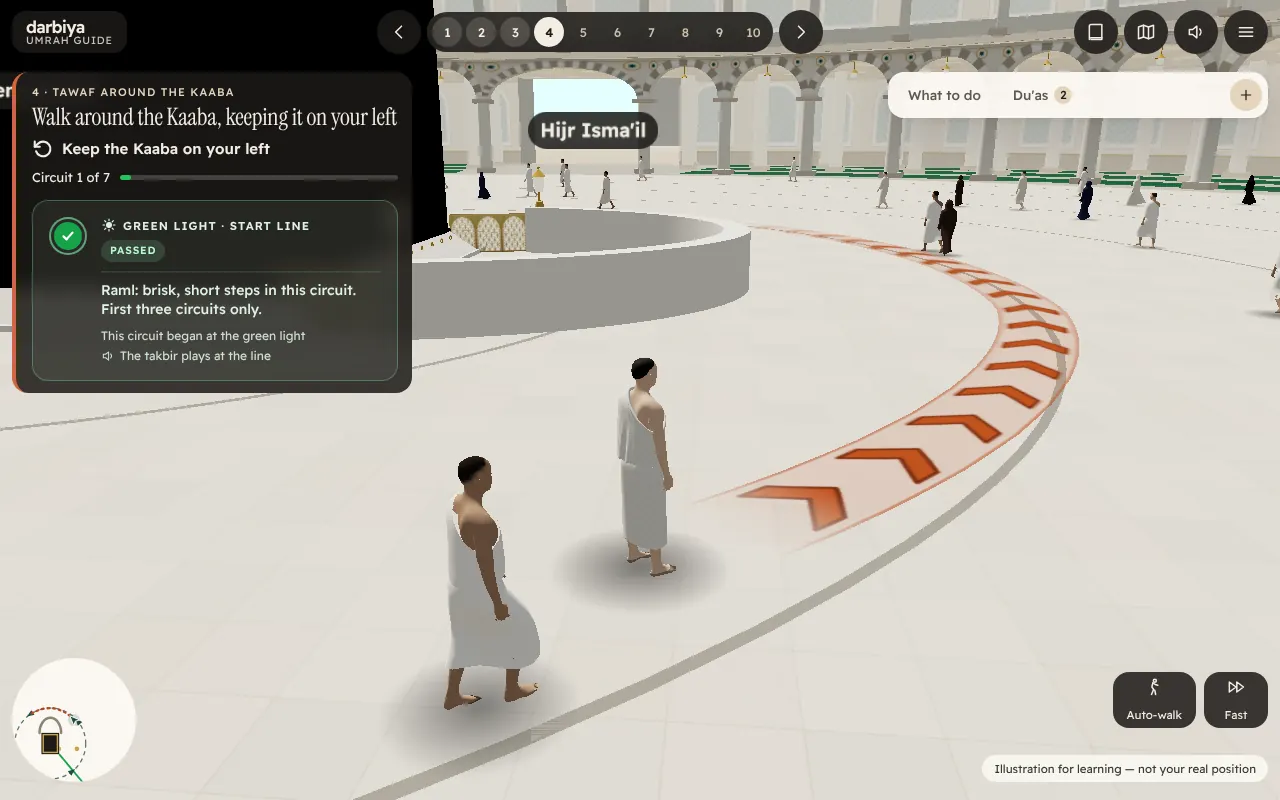
The 3D walk during tawaf: the pilgrim in ihram beside the Hijr, orange arrows on the floor, the circuit counter and the mini-map

3D walk

Best for: newer phones, tablets and computers

  • Walk a pilgrim through the gate, around the Kaaba and along the Mas'a, as you would see it standing there.
  • Orange arrows on the floor show the way; the card says when to turn right or left.
  • The seven circuits and the seven rounds are counted for you, and the green lights tell men when to run.
  • The figure wears the ihram as the step requires: the right shoulder bare in tawaf, covered again after it.
  • Day, Maghrib or night; other pilgrims on or off.
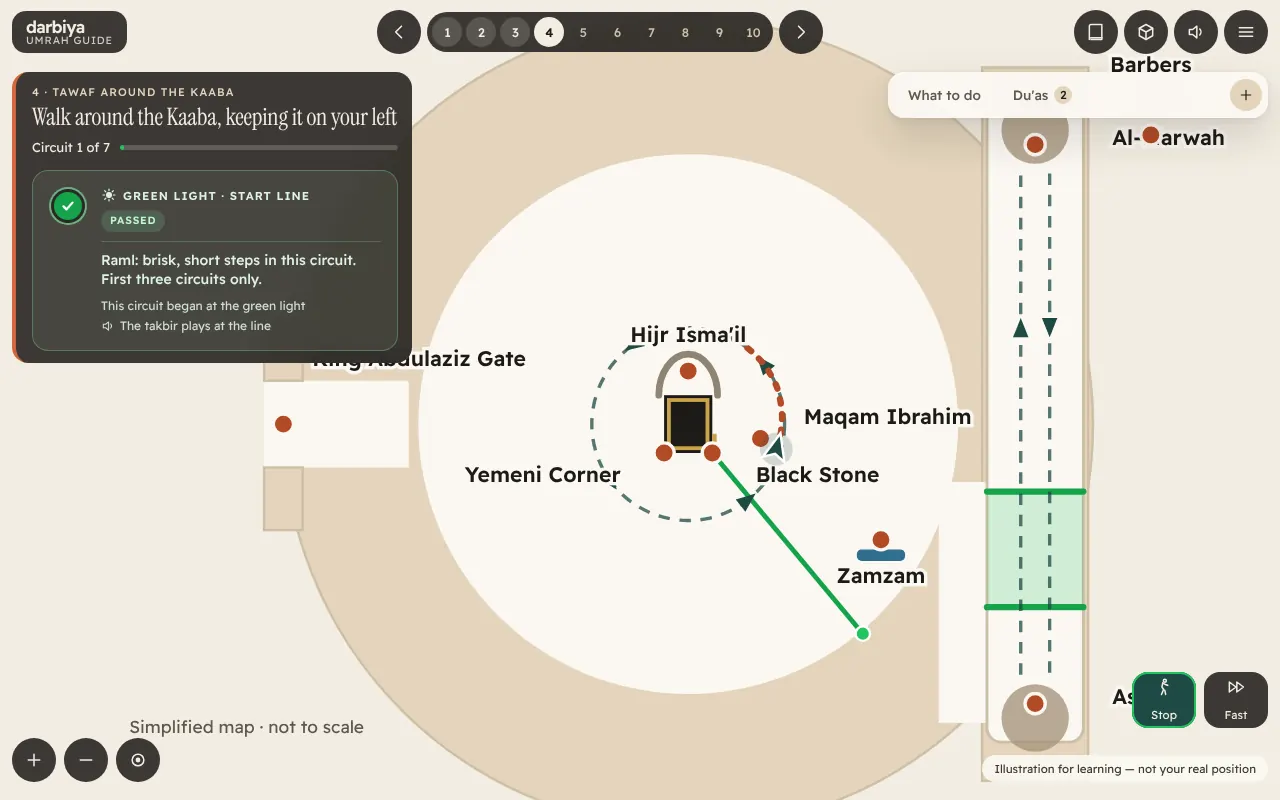
The 2D map during tawaf: the Kaaba, the Hijr, the Black Stone and Yemeni Corner, Maqam Ibrahim, Zamzam and the Mas'a from above, with the route

2D map

Best for: older phones, slow data, a quick look

  • The whole mosque from above: the Black Stone corner, the Hijr, Maqam Ibrahim, Zamzam, as-Safa and al-Marwah.
  • The direction of tawaf and of sa'i, and the green-light stretch, drawn on the map.
  • The same step cards, counting, voice guide and du'as as the 3D walk.
  • Much lighter: it opens fast and runs on almost any phone.
  • Zoom in and out, and centre on the pilgrim with one tap.

What you see on the screen

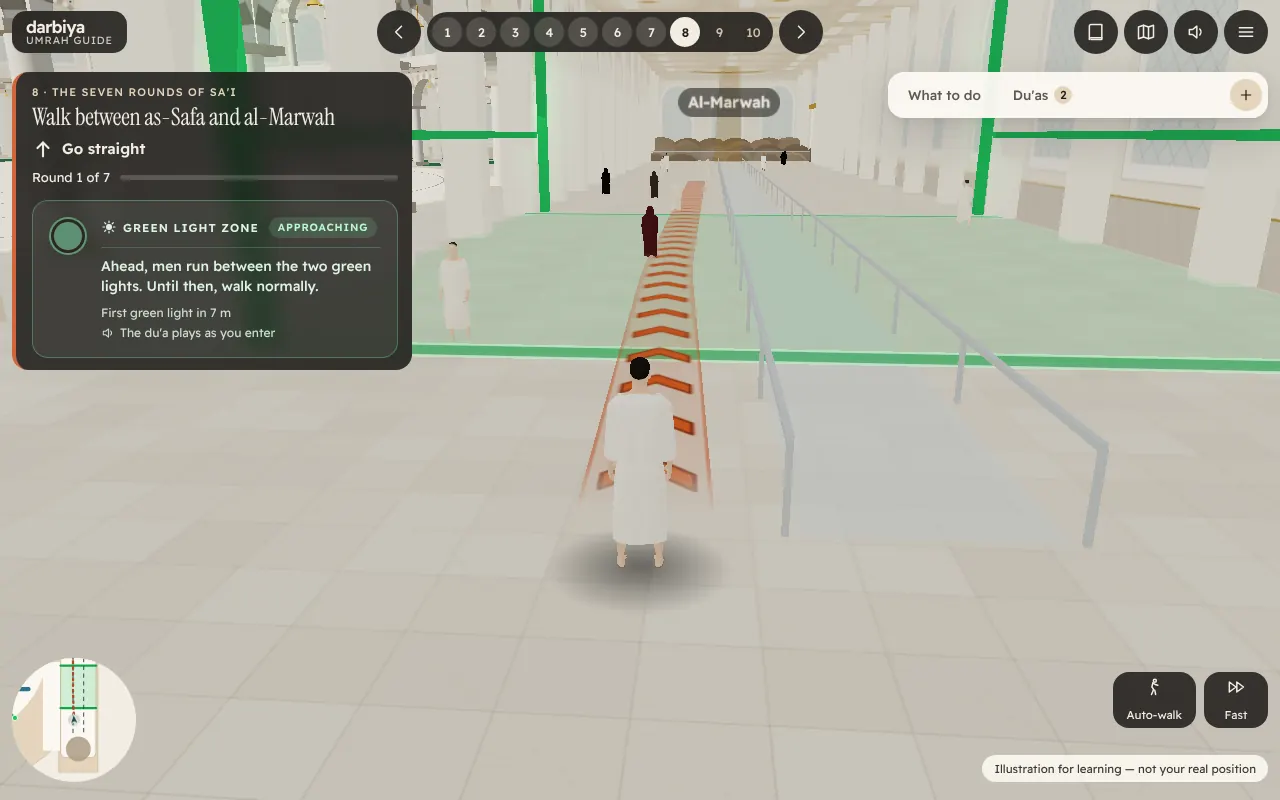
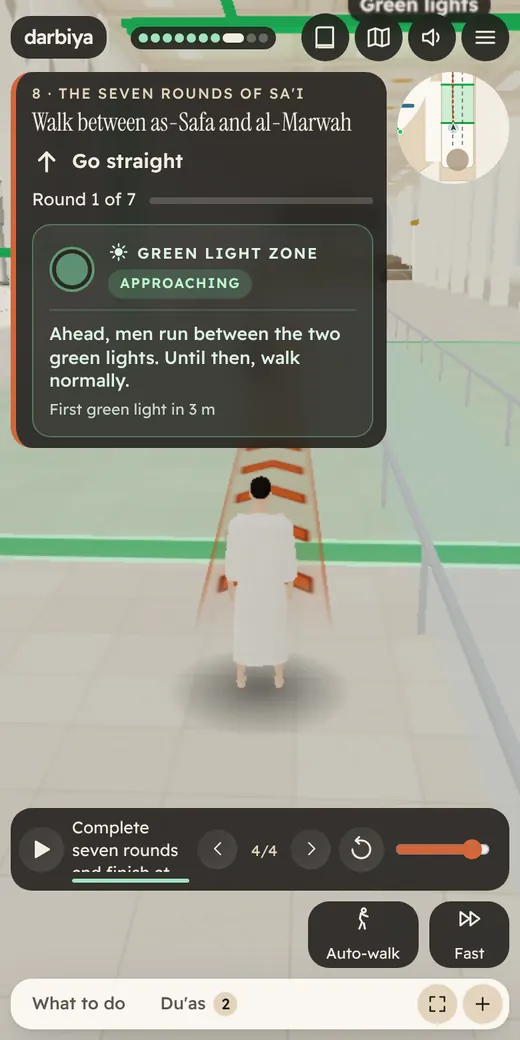
The 3D walk during sa'i, between as-Safa and al-Marwah.

The 3D walk during sa'i with numbered parts of the screen
  1. The ten stages Where you are in Umrah. Tap a number to go to that stage.
  2. The task card What to do now, which way to go, the circuit or round you are on, and the green lights.
  3. Arrows on the floor The route to the next place. They can be turned off in Settings.
  4. What to do · Du'as The steps with their reasons and common mistakes, how the ihram is worn now, and the du'as with Arabic, meaning and source.
  5. Book, map, sound, menu The whole guide book, the switch between 3D and 2D, the voice guide on or off, and Settings.
  6. Mini-map Where the pilgrim is in the mosque. Tap it for the full map.
  7. Auto-walk · Fast Let the pilgrim follow the route by itself, and speed it up through the long walks.

How it works

  1. Choose who and how

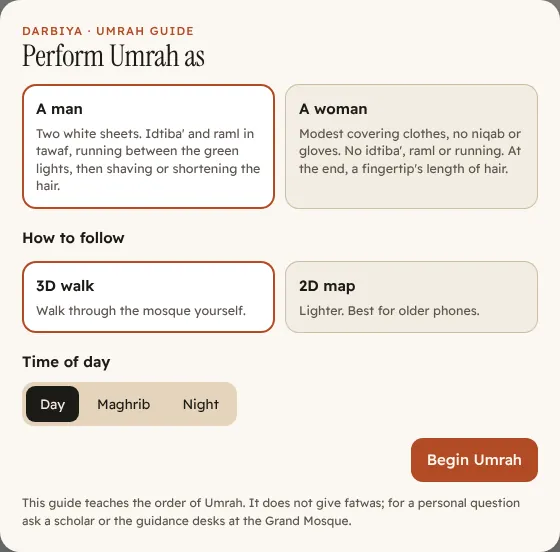
    Perform Umrah as a man or a woman: the steps, the clothing and the voice follow your choice. Then pick the 3D walk or the 2D map, and the time of day.

  2. Walk, or let it walk

    Move the pilgrim yourself, or press Auto-walk. Each place opens its step: a short card with one button when there is something to do, such as making the intention or covering the shoulders.

  3. Listen and read

    The guide speaks each step in English or Bangla, then the du'a of the place in Arabic and its meaning. The Qur'anic verses are recited by Sheikh Muhammad Ayyoub.

  4. Stop and come back

    Your place is saved on this phone. Press Continue next time, or jump to any stage from its page.

The first screen: perform Umrah as a man or a woman, 3D walk or 2D map, and the time of day

Inside the guide

Every du'a, with its source

Arabic, transliteration, English and Bangla meaning, and the verse or hadith it comes from. What is established is marked apart from what is optional.

How to wear ihram

The izar and the rida with pictures, idtiba' in tawaf and when it ends, and how a woman dresses. The figure in 3D changes with each step.

A man's or a woman's journey

A woman's steps leave out idtiba', raml and running, and end with a fingertip's length of hair. Her narration is her own.

Spoken guide

Every step spoken in English or Bangla, in a man's or a woman's voice, with subtitles. Replay any sentence, or turn the voice off.

On your phone, even offline

Nothing to install. After the first visit the pages, maps and steps open without internet; you can also add it to your home screen.

Easy to read

Large text, the floor arrows, other pilgrims and the graphics level can all be set in Settings.

Controls

On a phone or tabletWith a keyboard
Drag the joystick at the bottomW A S D · ← ↑ → ↓Walk
Auto-walk buttonFFollow the route by itself
Fast buttonXFaster
The button on the cardE · EnterDo the step (make the intention, pray…)
Arrows at the topN · BNext or previous step
Map buttonMMap
Menu buttonEscMenu and Settings

Before you start

  • Any up-to-date browser: Chrome, Safari, Edge, Firefox or Samsung Internet. Nothing to install.
  • The 3D walk needs WebGL, which most phones of the last few years have. It loads about 1–2 MB the first time; the 2D map far less.
  • If 3D is slow or the phone gets warm, set Graphics to Low in Settings, or switch to the 2D map.
  • Earphones help in a quiet place; the voice guide can also be read as subtitles.
  • It is a model for learning before you go. Inside the mosque, follow the signs and the staff.
The 3D walk on a phone during sa'i

The ten stages of Umrah

Each stage has its own page with the steps, the supplications and their sources.

  1. Preparation and intentionالاستعداد والنية

    Before the miqat: sincere intention, cleanliness, and knowing the four acts of Umrah — ihram, tawaf, sa'i and shaving or shortening the hair.

  2. Ihram and its rulesالإحرام

    Ihram is entering the state of Umrah at the miqat with the intention, then reciting the Talbiyah until you begin tawaf.

  3. Entering Masjid al-Haramدخول المسجد الحرام

    Enter with the right foot and the supplication for entering any mosque. There is no special supplication proven for the first sight of the Kaaba.

  4. Tawaf around the Kaabaالطواف

    Seven circuits around the Kaaba, counter-clockwise, each starting and ending at the Black Stone corner, with the Kaaba on your left.

  5. Completing tawaf and the two rak'ahsركعتا الطواف

    After the seventh circuit, men cover the right shoulder again; then pray two rak'ahs behind Maqam Ibrahim, or anywhere in the mosque if it is crowded.

  6. From Maqam Ibrahim to Zamzamزمزم

    After the prayer, drink Zamzam water from the dispensers on the way to the Mas'a. It is recommended, not a condition of Umrah.

  7. Beginning sa'i at as-Safaالصفا

    Sa'i starts on as-Safa. Recite the verse once as you approach, face the Kaaba, and say the dhikr three times with du'a in between.

  8. The seven rounds of sa'iالسعي

    Safa to Marwah is one round and Marwah back to Safa is the second. Seven rounds, ending at al-Marwah.

  9. Halq or taqsirالحلق أو التقصير

    Men shave the head (halq), which is better, or shorten the hair all over (taqsir). A woman cuts about a fingertip's length from the ends of her hair.

  10. Completion of Umrahتمام العمرة

    With the hair cut, Umrah is complete and everything that ihram prohibited becomes permitted again.

How to wear ihram →With pictures: the izar, the rida, idtiba' in tawaf, and how a woman dresses.

Common questions

Should I use the 3D walk or the 2D map?

Both teach the same steps and du'as. The 3D walk shows the mosque as you will see it and suits newer phones and computers. The 2D map shows everything from above, is much lighter and suits older phones or slow internet. You can switch at any time from the menu.

Do I need to install an app?

No. It runs in the browser on a phone, tablet or computer. You can add it to your home screen from the browser menu, and after the first visit it opens offline.

What are the steps of Umrah in order?

Enter ihram at the miqat with the intention and Talbiyah, perform seven circuits of tawaf around the Kaaba, pray two rak'ahs, perform seven rounds of sa'i between as-Safa and al-Marwah, then shave the head or shorten the hair.

Is there a specific du'a for each circuit of tawaf?

No. The only supplication established for a specific place in tawaf is Rabbana atina fid-dunya hasanah between the Yemeni Corner and the Black Stone. Elsewhere you may make any dhikr or du'a.

Where does sa'i start and end?

Sa'i starts at as-Safa and ends at al-Marwah. Going from Safa to Marwah is one round and returning is another, for seven rounds in total.

Does the Darbiya Umrah guide track my position inside the Haram?

No. The 3D walk and the 2D map are illustrative. Phone GPS is not accurate inside the mosque, so you move through the steps yourself. The optional location check only tells you roughly how far you are from Masjid al-Haram.

Can I use the guide without internet?

Yes. After the first visit the steps, supplications and maps are stored on your phone and open offline.

The guide teaches the order of Umrah as described in the sources above. Scholars differ on some details. For a personal question, ask a scholar you trust or the guidance desks at the Grand Mosque. Sources